
Type presets and default styles
Save character and paragraph settings as type presets, store a default type style with the document, and change the font and size of every type layer at once.
PixelForge has three ways to reuse type settings. Pick the one that matches what you want to keep.
| Feature | Saves | Stored |
|---|---|---|
| Type presets | Character and paragraph settings | In this browser, for every document |
| Default type styles | One style for the document | With the document (draft and project file) |
| Update All Text Layers | Nothing; applies a font and size to every type layer once | Not applicable |
#Type presets
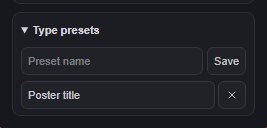
- Style some type the way you like, or select a type layer that already has the look.
- With a type tool active, open the Type presets group at the bottom of the sidebar's Text section.
- Enter a name and click Save.
To use a preset, click its name. It applies to the selected characters while you edit, to the whole selected type layer, or to new type when nothing is selected. Click × next to a preset to delete it.
Type presets are kept in this browser only (up to 40). They are not part of your documents or project files, and they are not synced to other devices.
#Default type styles
- Type > Save Default Type Styles stores the selected type layer's font, size, colour, weight, box width, alignment, line height, tracking and orientation with the document.
- Type > Load Default Type Styles applies that stored style to the selected type layer. The text itself does not change, and the change is one undoable step.
Because the default style is saved with the draft and in project files, it travels with the document.
#Change every type layer at once
Type > Update All Text Layers sets one font and size (1 to 1000 px) on every editable type layer in the document:
- Choose Type > Update All Text Layers.
- Choose a Font (or click Aa to browse) and enter a Size.
- Click Update text.
All type layers stay editable, other layers are not touched, and one Ctrl+Z undoes the whole change. Size and font set on individual characters are kept.
Still stuck? See Troubleshooting or report a problem.