
Find, replace and check spelling
Replace words across all type layers with Find and Replace Text, and list unknown words with Check Spelling, all inside your browser.
Both commands work on the editable type layers of the current document. Your text is never sent anywhere.
#Find and replace text
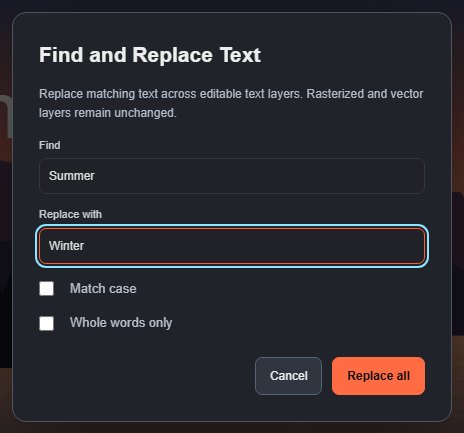
- Choose Edit > Find and Replace Text…, or click Find & Replace… in the Paragraph settings of the Text section.
- In the Find box, enter the text to look for.
- In the Replace with box, enter the new text. Leave it empty to delete every match.
- Optionally tick Match case or Whole words only.
- Click Replace all.
The status bar reports how many matches were replaced in how many layers. All replacements are one history step. If nothing matches, the document does not change.
Good to know:
- Only editable type layers are searched. Rasterized type, shapes, paths and pixel layers are left alone.
- Replacement text takes the character styling of the text it replaces.
- The replacement is inserted exactly as typed; there are no wildcards or patterns.
- The command is unavailable when the document has no type layers.
To search for menu commands rather than text, use Search commands.
#Check spelling
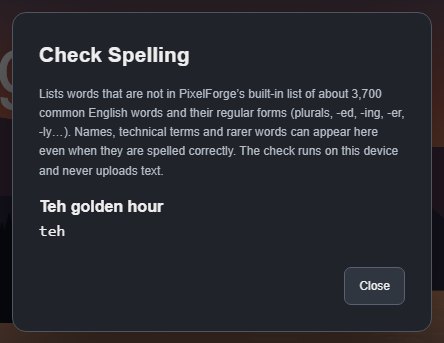
- Choose Edit > Check Spelling…, or click Check spelling… in the Paragraph settings.
- The dialog lists each word it does not recognise once, grouped under the type layer it comes from, with the number of times it occurs. The first time you open it in a session, it shows "Loading word list…" for a moment.
- Fix the words on the canvas (see Edit text on the canvas) or with Find and Replace.
- Click Close or press Esc.
Check Spelling does not change anything by itself.
Check Spelling compares your words with a built-in list of about 3,700 common English words, in British and American spellings. It also accepts their regular forms: plurals and verb endings (hours, edited, editing), comparisons (brighter, brightest), endings such as -ly and -ness, and common prefixes such as un- and re-. Short all-capital words (acronyms of up to five letters, such as RGB) and single letters are skipped, and hyphenated words are checked part by part. In the example above, only teh is listed.
The list is part of the editor, so the check also works offline. If it cannot be loaded, the dialog says so and uses a minimal list instead.
While you type on the canvas, your browser may also underline misspelt words with its own spell checker, in the language your browser is set to.
Still stuck? See Troubleshooting or report a problem.