
Noise filters
Add grain with Add Noise, or clean up speckles, dust and grain with Median, Dust & Scratches, Despeckle, Reduce Noise, AI Denoise and Reflection Removal.
The noise filters either add grain to a picture or remove unwanted grain, specks and small bright spots. They are live filters, so you can tune or remove them later without losing your original pixels. See Filters overview for the basics.
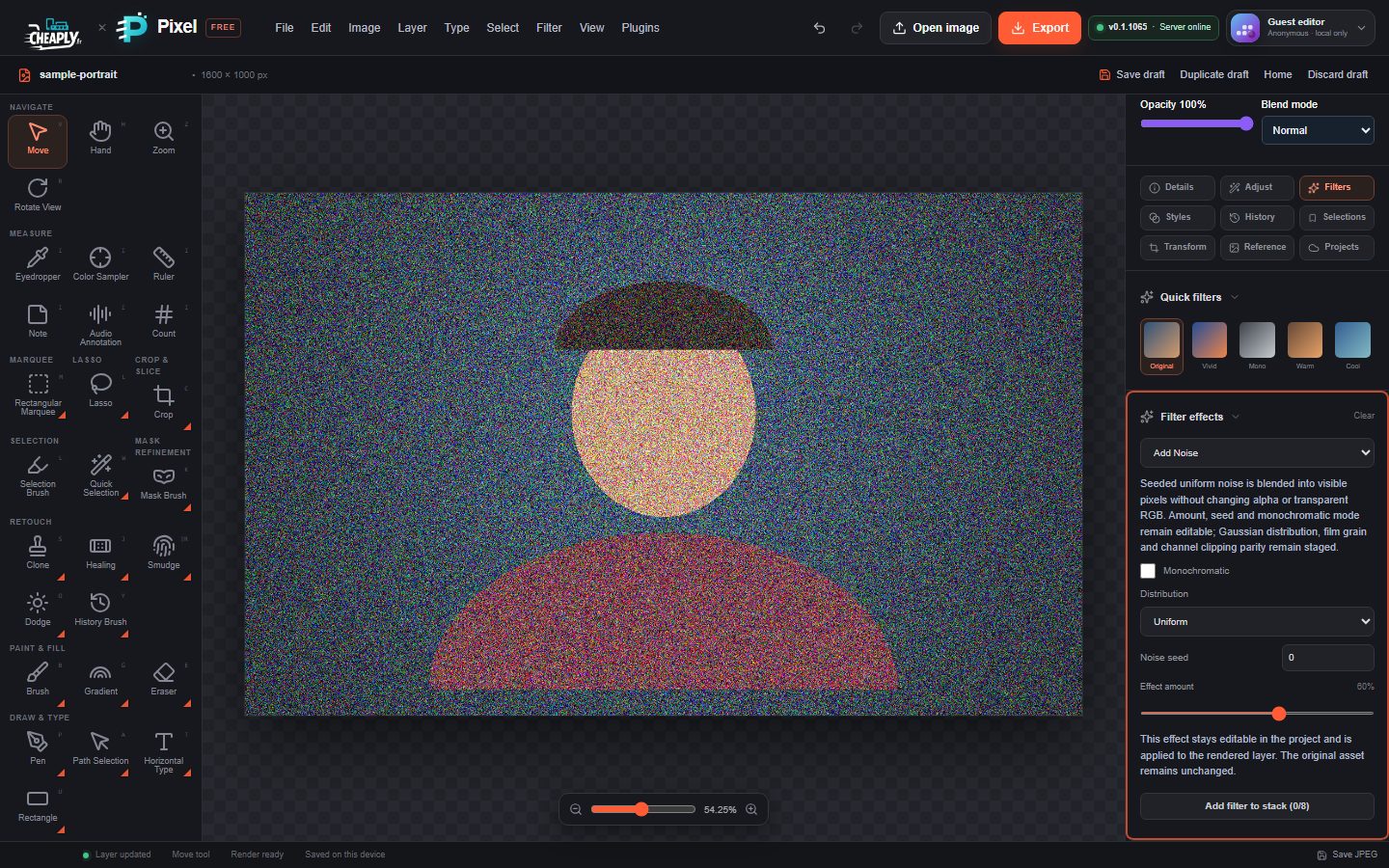
#Apply a noise filter
- Select a visible, unlocked layer. Make a selection first to treat only part of it.
- Choose a command from the Noise part of the Filter menu, or Filter > AI Denoise….
- Open the Filters panel and adjust Filter effects.
Several noise filters measure differences in brightness levels from 0 to 255. The panel shows these thresholds as levels, for example "12 / 255".
#Add Noise
Adds random grain to visible pixels. Transparent areas stay transparent. The controls follow the order of Photoshop's Add Noise dialog, but the noise is PixelForge's own approximation.
| Option | Range | Default | What it does |
|---|---|---|---|
| Amount | 0–100 % | 70 % | Strength of the noise: the largest change to a colour channel, as a share of the 0–255 range. The readout shows it in levels too, for example "70% · ±179 levels". Type an exact value, such as 12.5, in the box under the slider. |
| Distribution | Uniform, Gaussian | Uniform | Uniform spreads the noise evenly; Gaussian keeps most of it small, with occasional stronger specks. |
| Monochromatic | on/off | off | Same noise in all colour channels, giving grey grain instead of coloured specks. |
| Noise seed | 0–4294967295 | 0 | Picks a different random pattern. The same seed always gives the same grain. |
#Median
Replaces each pixel with the median of its neighbours. It removes isolated specks and flattens fine texture.
| Option | Range | Default | What it does |
|---|---|---|---|
| Effect amount | 0–100 % | 100 % | Mix with the original. |
| Blur radius | 1–64 px | 2 px | Size of the neighbourhood. Values above 8 px give the same result as 8 px. |
#Dust & Scratches
Finds pixels that differ strongly from their neighbourhood (dust, small scratches) and blends them towards the neighbourhood median. Pixels close to their surroundings are left alone.
| Option | Range | Default | What it does |
|---|---|---|---|
| Effect amount | 0–100 % | 100 % | Mix with the original. |
| Outlier threshold | 0–255 levels | 12 / 255 | How different a pixel must be before it is cleaned. Raise it to protect fine detail. |
| Radius | 1–64 px | 2 px | Size of the neighbourhood. Values above 8 px give the same result as 8 px. |
#Despeckle
A one-click clean-up with a fixed one-pixel neighbourhood and a fixed threshold. It has only Effect amount (default 100 %).
#Reduce Noise
Smooths each pixel with nearby pixels of a similar tone, which reduces grain while keeping edges.
| Option | Range | Default | What it does |
|---|---|---|---|
| Effect amount | 0–100 % | 100 % | Mix with the original. |
| Preserve details | 0–255 levels | 25 / 255 | How similar a neighbour must be to be used. Lower values keep more detail; higher values smooth more. |
| Radius | 1–64 px | 2 px | Size of the neighbourhood. Values above 8 px give the same result as 8 px. |
#AI Denoise
Filter > AI Denoise… is a private, local approximation. It does not use an AI model and does not upload anything. It separates brightness from colour, smooths colour speckles more strongly than brightness, and protects strong edges.
| Option | Range | Default | What it does |
|---|---|---|---|
| Effect amount | 0–100 % | 100 % | Mix with the original. |
| Edge protection | 0–255 levels | 18 / 255 | Brightness differences above this level count as edges and are kept. |
| Radius | 1–64 px | 3 px | Size of the neighbourhood. Values above 6 px give the same result as 6 px. |
It works on single images only; it does not use RAW data or several frames.
#Reflection Removal
Edit > Reflection Removal… uses the same live Filter effects controls. It looks for small, bright, almost colourless spots (such as glare on glasses or glossy surfaces) and blends them towards the median of their neighbours.
| Option | Range | Default | What it does |
|---|---|---|---|
| Effect amount | 0–100 % | 70 % | Mix with the original. |
| Reflection threshold | 0–255 levels | 28 / 255 | How much brighter than its surroundings a spot must be to be treated. |
| Cleanup radius | 1–64 px | 4 px | Size of the neighbourhood. Values above 8 px give the same result as 8 px. |
It does not detect reflections by meaning and cannot rebuild what is behind large, coloured or textured reflections. For those, use the healing tools or Content-Aware Fill.
Still stuck? See Troubleshooting or report a problem.