
Stroke a selection
Draw an outline along the edge of a selection with Edit > Stroke Selection…, choosing width, colour, inside, centre or outside placement, blend mode and opacity.
Edit > Stroke Selection… paints a line along the edge of the current selection onto the active layer: for example a ring around a circle or a frame around a photo.
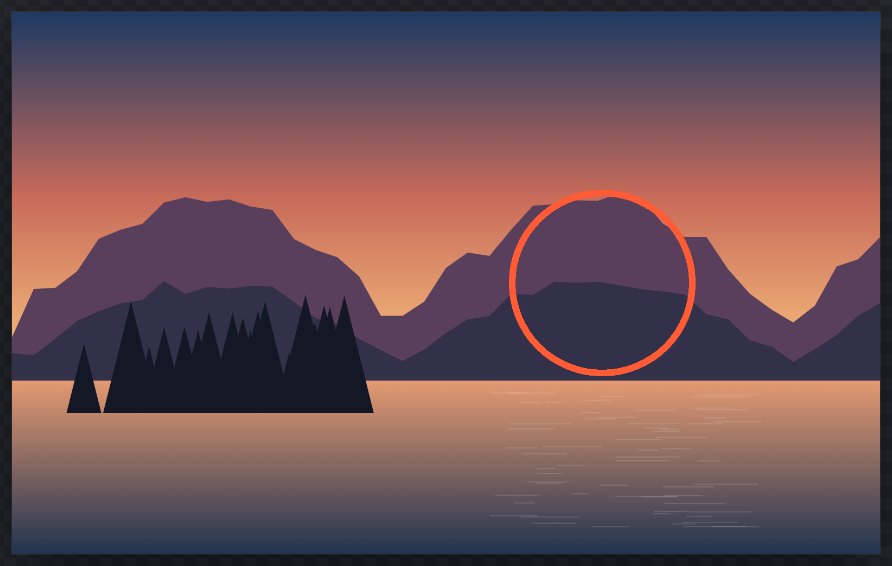
#Stroke a selection
- Make a selection. Any kind works: marquee, lasso, Magic Wand, Color Range, feathered or combined selections.
- Select a visible, unlocked raster (pixel) layer. Tip: add a new paint layer first (Layer > New Paint Layer) so the stroke stays separate and easy to change.
- Choose Edit > Stroke Selection….
- Set the options (below) and click Stroke.
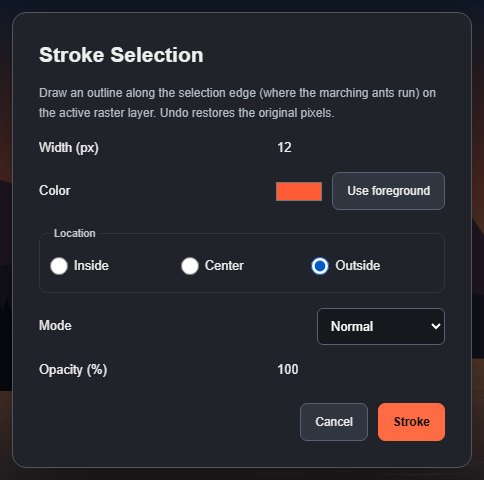
#Options
| Option | What it does | Default |
|---|---|---|
| Width (px) | Stroke thickness, 1 to 250 px in 0.5 px steps (a decimal comma is accepted). | 4 px |
| Color | The stroke colour. Use foreground sets it back to the foreground colour. | Foreground colour |
| Location | Inside draws the band just inside the edge, Outside just outside it, Center half on each side. | Center |
| Mode | A blend mode, as in the Fill dialog. | Normal |
| Opacity (%) | A whole number from 1 to 100. | 100 |
The dialog remembers your last settings until you reload the page. If a value is out of range, Stroke is disabled and the accepted range is shown. Cancel or Esc changes nothing.
#How the stroke follows the edge
- The stroke follows the marching ants: the line where the selection is 50% selected. A feathered selection is stroked along its visible outline, and the stroke itself has a crisp, anti-aliased edge (it is not feathered).
- Combined selections are stroked along their combined outline. Holes cut out with Subtract get their own outline.
- Curves and diagonals keep the same width as straight edges.
- Areas beyond the canvas count as unselected. Select > All with Inside draws a frame along the canvas edge. With Outside the whole stroke would lie beyond the canvas, so nothing is drawn and the status bar says "Nothing to stroke: an Outside stroke of a selection that fills the canvas lies entirely beyond the canvas edge".
The stroke is drawn over the existing pixels with the chosen mode and opacity, and is one undo step.
#Limits
The stroke becomes pixels on the layer. It is not an editable vector line or a layer style; to change it, undo and stroke again. For an editable outline that follows a layer's content, use the stroke in Layer styles; for paths, see Stroke a path.
Stroke Selection… is disabled when there is no selection or the active layer is not a visible, unlocked raster layer. A selection that covers no pixels shows No pixels are selected.
Stroking is quick for most selections. On a 12-megapixel (3000 × 4000) layer, a stroke around a selection that covers most of the picture takes about 2 seconds on a typical computer; a lasso-sized selection takes under a second.
Still stuck? See Troubleshooting or report a problem.