
Select a colour everywhere with Color Range and Similar
Use Select > Color Range… to select every pixel close to a chosen colour, and Select > Similar to extend a selection to matching colours across the image.
Color Range… and Similar select pixels by colour across the whole image, whether or not they are connected. Unlike Magic Wand, their edges are soft: pixels slightly further from the target colour are partly selected.
Both look at all visible layers combined and follow the Selection mode in Selection options (Replace, Add, Subtract or Intersect).
#Color Range
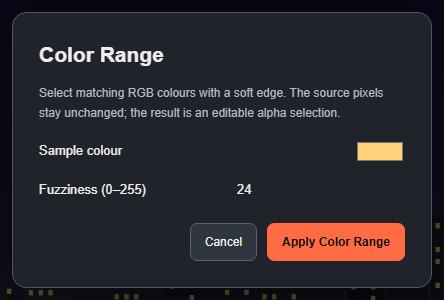
- Choose Select > Color Range….
- Set Sample colour. It starts as your current foreground colour; click the swatch to pick another.
- Set Fuzziness (0–255): low values select only colours very close to the sample, high values reach further. It starts at your current Color tolerance setting (24 unless you changed it).
- Click Apply Color Range.

#Similar
Select > Similar grows an existing selection to every pixel in the image with a colour like the selected area.
- Make a selection on the colour you want, for example a small marquee on one window.
- Set Color tolerance in the options of Quick Selection or Magic Wand. Similar uses it as its fuzziness.
- Choose Select > Similar.
Similar averages the colours inside your selection, so a selection that mixes very different colours gives a muddy result. It needs a selection and is disabled without one.
#Limits
Both commands compare plain RGB colour. They do not understand objects or lighting, so a shadowed part of the same object may not be selected. They run locally, and the result is an ordinary editable selection that you can modify, save or turn into a mask.
Still stuck? See Troubleshooting or report a problem.