
Customise the menus and toolbar
Choose the number of toolbar columns, hide or reorder tool categories and tools, and hide menu commands that are not available yet.
These settings change only how the editor looks in this browser. They never change your documents and are not stored in drafts or project files.
#Toolbar
Choose Edit > Toolbar….
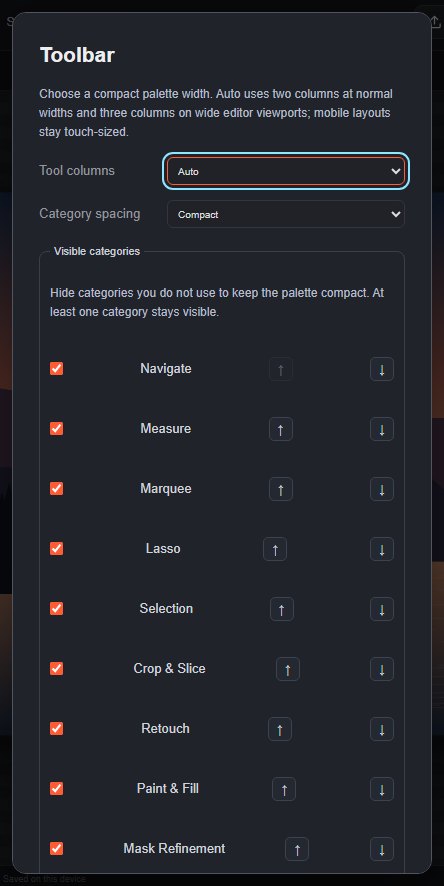
| Setting | What it does |
|---|---|
| Tool columns | Auto uses two columns at normal widths and three on wide screens. Choose Two columns or Three columns to fix it. On narrow phone screens the toolbar always uses at most two columns so buttons stay easy to tap. |
| Category spacing | Compact or Comfortable space between the tool groups. |
| Visible categories | Untick a category (for example Mask Refinement) to hide it from the toolbar. At least one category stays visible. Use ↑ and ↓ to change the order of the categories. |
| Tool order | Reorder the tool buttons inside each category. Tools of the same family stay together in their press-and-hold menu. |
Click Apply to save, or Reset defaults to go back to the standard toolbar.
#Tool families
Each toolbar button is a family of related tools. A small triangle in the bottom-right corner of a button (the top-right corner on a phone) shows that it has more tools. Press and hold the button, or right-click it, to open the family menu and choose another tool. The button then shows the tool you chose, and remembers it.
#Menus
Some menu entries are listed but not available yet; they are always shown dimmed. To hide them, choose Edit > Menus…, untick Show disabled roadmap commands and click Apply menu settings.
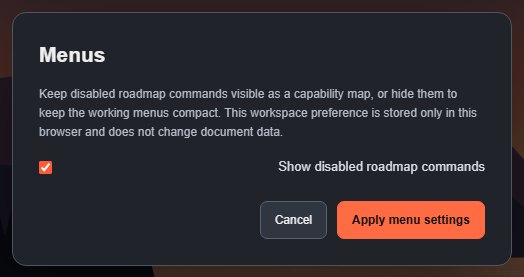
Commands that are only temporarily unavailable, such as Merge Layers when one layer is selected, are not hidden. Hiding entries does not remove them from Search commands, where they stay dimmed.
#Keyboard shortcuts
You can assign your own keys to tools and menu commands. See Keyboard shortcuts.
Still stuck? See Troubleshooting or report a problem.